


Make Writing Easier
with Zoho’s Word Processing Tool
As an intuitive online word processor, Zoho Writer simplifies document creation and teamwork. Devtac helps businesses set it up quickly and effectively, so your team can focus on getting work done without the tech hassles.
Powerful Writer. Powerful Words.
Solving Document Problems with Zoho Writer
Creating, editing, and collaborating on documents often leads to issues like formatting inconsistencies, version confusion, and limited real-time collaboration. These challenges slow productivity and frustrate teams.
Zoho Writer was designed to eliminate these pain points by offering seamless co-authoring, automatic version tracking, and intuitive formatting options—all in a cloud-based platform. As a word processing tool, it empowers users to work more efficiently and accurately, whether solo or in teams, making document management simpler, faster, and more collaborative than ever before.
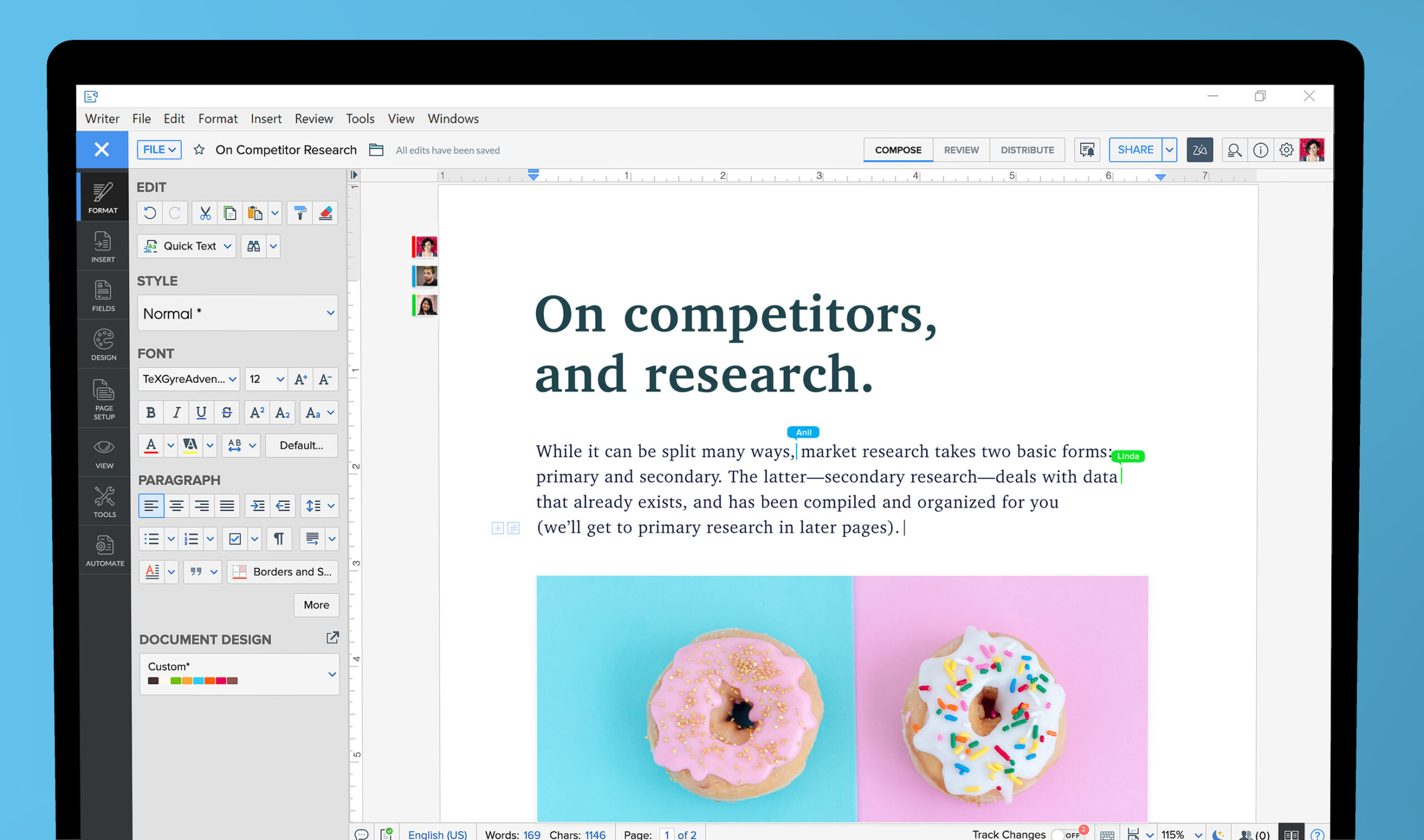
Zoho Writer Features
Zoho Writer is a powerful word processing tool designed for seamless document creation, real-time collaboration, and intelligent editing—ideal for professionals, teams, and anyone who values efficiency.
Intuitive Document Creation
Craft professional-looking documents effortlessly with Zoho Writer’s user-friendly interface. From business reports and letters to resumes and articles, this versatile word processor software simplifies formatting and design, helping users produce polished content quickly. Its intuitive layout makes writing easy, even for beginners, while offering professional-grade features for advanced users.
Real-time Collaboration
Collaborate with ease using Zoho Writer’s built-in tools for simultaneous editing and commenting. This efficient online word processor keeps team members connected in real time, allowing instant feedback, smoother revisions, and faster approvals.
Smart Editing Tools
Elevate your writing with Zoho Writer’s advanced editing capabilities. Features include grammar and spell-check, contextual suggestions, and writing style improvements. These intelligent tools, built into the intuitive word processing app, enhance accuracy and clarity—empowering users to produce professional, error-free content with greater speed and confidence.
Flexible Document Sharing
Share documents securely with customizable access settings in Zoho Writer. You can define who can view, comment, or edit each file, enabling safe collaboration. Maintain full control over your content, protect sensitive information, and streamline teamwork—making document distribution simple, secure, and efficient for both personal and professional use.
Offline Access and Sync
Continue working even without internet access using Zoho Writer’s offline mode. Create and edit documents anywhere, and enjoy automatic syncing once reconnected. This reliable feature ensures productivity isn’t interrupted, allowing seamless updates across devices—perfect for remote work or travel, where consistent connectivity isn’t always guaranteed.
Zoho Writer Benefits
Enhanced Productivity
Zoho Writer boosts productivity with its streamlined features, allowing users to create and edit documents efficiently using a powerful word processor application.
Seamless Remote Collaboration
This online word processor enables real-time teamwork, letting multiple users collaborate simultaneously, regardless of location, for faster document development.
Accessible Anytime, Anywhere
With cloud integration and offline support, Zoho Writer ensures users can access and update their documents anytime, from any device or location.
Frequently Asked Questions About Zoho Writer
What makes Zoho Writer a reliable word processing tool for business use?
Zoho Writer is a solution for businesses needing a streamlined, efficient way to manage their documents. It offers an intuitive interface, advanced formatting, and seamless integration with cloud services. Teams can collaborate in real time, access version history, and ensure secure file sharing. As a word processing tool, it eliminates complexity and brings speed and clarity to document creation, helping organizations boost productivity and maintain consistency in their written communication.
Can Zoho Writer be used offline?
Yes, Zoho Writer includes offline functionality that allows users to view and edit documents without an internet connection. Changes made offline are automatically synced once the device reconnects, ensuring that your work is always saved and up to date. This is especially useful for remote employees, travelers, or users in areas with intermittent internet access.
How does Zoho Writer support collaboration among team members?
Zoho Writer offers a comprehensive collaboration suite, including real-time co-editing, inline comments, suggestion mode, and permission controls. Users can assign tasks, track changes, and engage in document discussions directly within the platform. These features reduce the need for constant email back-and-forth and enable quicker decision-making. It’s ideal for teams working across departments or locations, as everyone can access the same version of the document simultaneously, fostering transparency and efficiency throughout the process.
Is Zoho Writer compatible with Microsoft Word documents?
Absolutely. Zoho Writer seamlessly supports both importing and exporting Microsoft Word files (.doc and .docx), preserving formatting elements like styles, tables, and headers. This cross-compatibility ensures that transitioning teams or collaborating with external partners who still use Microsoft Office doesn’t create workflow disruptions. The platform makes document exchange smooth and professional, eliminating the need for manual reformatting or data loss.
Why should I choose Devtac to help integrate Zoho Writer into my business?
Devtac is a certified Zoho partner that specializes in tailoring Zoho solutions to meet specific business needs. Our team provides technical integration, employee onboarding, and ongoing support to ensure Zoho Writer is used to its full potential. With expert knowledge of the platform and how it aligns with your operational goals, Devtac makes implementation seamless. Businesses can count on Devtac to help them make the most of this powerful word processor software while reducing setup complexity and driving long-term value.
What Clients Says
About Zoho Writer


Devtac made the implementation easier
...
With Devtac as Zoho's local support, our concerns are faster to resolve than when we directly dealt with Zoho, where our support is based in Australia
...
Devtac provided guidance and support on the process, ensuring a smooth transition.
...





Devtac helped me with the CRM setup, transition, coding, and setting up custom functions. The Account Manager even tutored me how to write custom functions. I am proud to say that with their help I am able to write my own custom functions and I am also able to help other Zoho users with custom function issues
...